
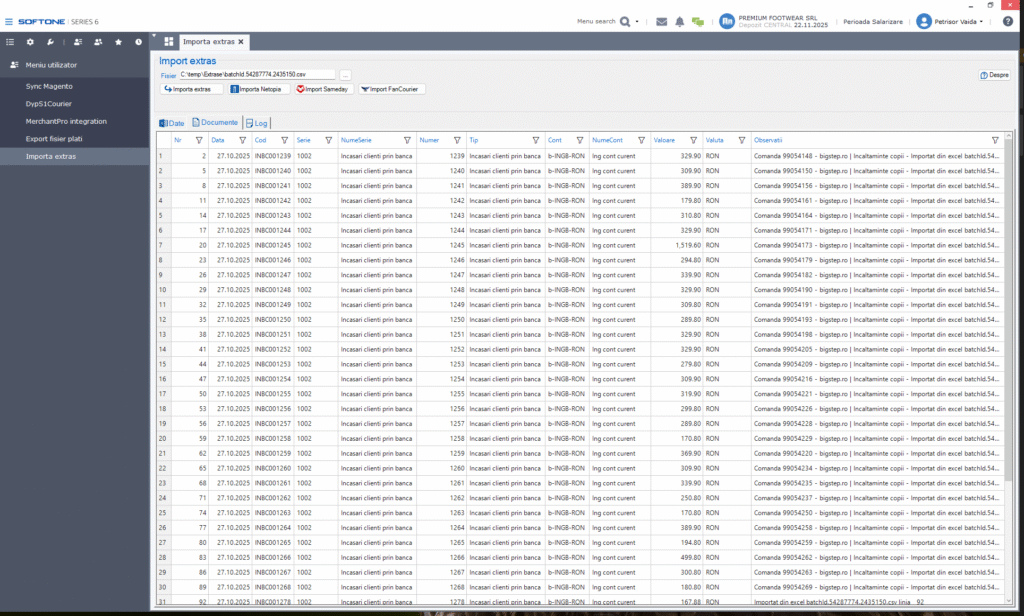
We developed a full integration module that connects SoftOne ERP with ING Bank, Netopia, Sameday, and FanCourier. The solution automates financial data import and export, increasing accuracy and drastically reducing manual data processing.
✔️ Key Features
ING Bank Integration
Export payment files in the official ING format
Import ING Bank account statements directly into SoftOne ERP
Netopia, Sameday & FanCourier Integration
Import of financial files from Netopia,Sameday, FanCourier
The module processes all lines and links the imported data to the related ERP documents.
✔️ Automated documents generation
The system can automatically generate:
supplier payments
customer receipts
special receipts from debtors
special payments to creditors
✔️ File Validation & Processing
For each imported file, the module provides:
line-by-line status (imported / not imported)
explanation for rejected rows
automatically generated processed file
list of created documents inside SoftOne ERP
A complete, stable, and scalable solution for businesses handling large volumes of payments and collections.
DypS1BankInt Softone ERP addon
Softone ERP integration with ING Bank, Netopia, Sameday and FanCourier
- export payment file in ING format
- import ING Bank statements
- import Netopia files format
- import Sameday files format
- import FanCourier files format
- create supplier payments, customer receipts, special from debtors, special from creditors
- show data from import file with status per line(imported or not) and create processed file
- show created documents
Dependencies
- Softone ERP
- .NET Framework 4.8
Installing
- Copy the DypS1BankInt folder to the Softone ERP installation folder as a DypS1BankInt subdirectory
- Copy xplorer.exe.config to the Softone ERP installation folder
- Create a menu entry of type DllForm with action .DypS1BankInt.dll;DypS1BankExp with name Dyp - Export fisier plati
- Create a menu entry of type DllForm with action .DypS1BankInt.dll;DypS1BankImp with name Dyp - Import extras
Using
- Open Dyp - Export fisier plati from Softone menu
- To export payment file from Softone, select "Start Date" and "End date" from the user interface and push the "Filter" button. All documents in period will be displayed. Push "Export fisier plati" button to export. A file FisierPlati.xlsx will be created in softone bin directory.
- To import files from Ing, Sameday, Netopia or FanCourier, open Dyp - Import extras from Softone menu, choose file to import and press coresponding import burtton. The file will be parsed and the corresponding documents will be generated in Softone. The Data, Documents and Log pages will be filled with data.
Uninstalling
- Remove menu entry Dyp - Export fisier plati and Dyp - Import extras created on install
- Delete subdir DypS1BankInt from Softone ERP installation folder
Authors
- Dragos Jarca dragos.jarca@dynamicpuzzle.ro
License
This project is licensed under the Dynamic Puzzle License.
Changelog
All notable changes to DypS1BankInt project will be documented in this file.
[1.0.6] - 2025-12-10
Release import Trendyol files format
[1.0.5] - 2025-12-03
For FanCourier, Netopia and Sameday use bank transfer
[1.0.4] - 2025-11-26
Release import FanCourier files format
Added
- import FanCourier files format
- create supplier payments, customer receipts, special from debtors, special from creditors
- show data from import file with status per line(imported or not) and export processed file
- show created documents
[1.0.3] - 2025-11-14
Release import Sameday files format
Added
- import Sameday files format
- create supplier payments, customer receipts, special from debtors, special from creditors
- show data from import file with status per line(imported or not) and export processed file
- show created documents
[1.0.2] - 2025-11-07
Release import Netopia files format
Added
- import Netopia files format
- create supplier payments, customer receipts, special from debtors, special from creditors
- show data from import file with status per line(imported or not) and export processed file
- show created documents
[1.0.1] - 2025-10-24
Release import ING Bank statements
Added
- import ING Bank statements
- create supplier payments, customer receipts, special from debtors, special from creditors
- show data from import file with status per line(imported or not) and export processed file
- show created documents
[1.0.0] - 2025-10-16
Initial release - export payment file in ING format
Added
- filter invoices received from spv and processed
- filter by date
- show them in grid, sort, totals, row number, select multiple lines
- export selected lines or all in excel in ING format
- export file name with date, hour, minute